 Telehub
How to Make a Telegram Channel Public
If you already have a private Telegram channel, you don't need to create another one. You can change the existing channel to public.
The exact labels can vary slightly depending on your device and Telegram version, but the process is generally:
Open Telegram.
Open the channel you own or manage.
Tap the channel name at the top.
Open Edit or the channel's settings.
Find Channel Type.
Select Public Channel.
Choose an available public username.
Save your changes.
Once the change is saved, the channel becomes publicly accessible through its username.
Telegram's documentation confirms that public channels have usernames and can be found through Telegram search, while private channels require users to be added or given an invite link. Telegram
Telegram's official Channels FAQ

Choose a Public Telegram Username
Making your channel public requires choosing a public username.
For example, if your username is:
examplechannel
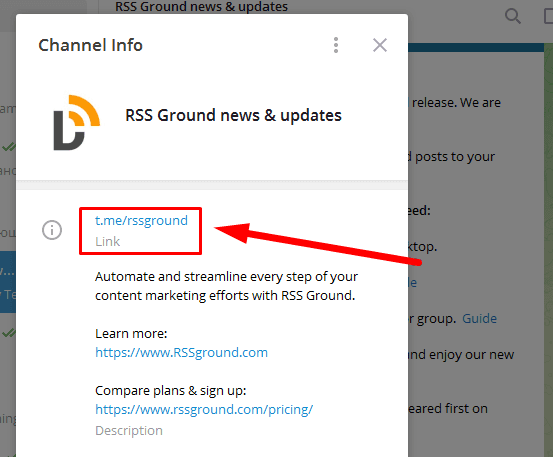
your public link becomes:
t.me/examplechannel
Telegram uses these usernames to make public channels identifiable and accessible. Public usernames can also be resolved through Telegram's search system. Telegram Core
Try to choose a username that is:
Short and easy to remember
Closely related to the channel's name
Easy to spell
Relevant to the channel's topic
If you're creating a channel for a brand, using the same name as the brand is usually the simplest approach when it's available.
Avoid unnecessarily adding random numbers or characters. A clean username makes the channel link much easier to remember and share.
What Happens When You Make a Telegram Channel Public?
The biggest change is discoverability.
Telegram says anyone can find a public channel through Telegram search and join it. A private channel, by comparison, generally requires an invitation from the owner or an invite link. Telegram
Your channel also gets a shareable public address based on its username.
For example:
@examplechannel
becomes:
t.me/examplechannel
That link can be shared outside Telegram on websites, social media profiles, directories, forums, or anywhere else you promote your community.
This is one reason making a channel public can be useful if your goal is to grow an audience rather than maintain a closed community.
Public Telegram Channel vs. Private Channel
The better option depends on what you're using the channel for.
Public Channel | Private Channel |
|---|---|
Has a public username | Doesn't need a public username |
Can appear in Telegram search | Generally accessed through invitations |
Has an easy-to-share public link | Uses invite links |
Better suited to open audiences | Better suited to restricted audiences |
Anyone can find and join it | Access can be more controlled |
Telegram describes private channels as closed communities where users need to be added by the owner or receive an invite link. Telegram
A public channel therefore makes more sense when you're trying to reach as many people as possible.
A private channel can make more sense for membership communities, internal updates, private content, or situations where you don't want the channel openly discoverable.
Why Can't I Make My Telegram Channel Public?
If Telegram isn't allowing you to make the channel public, first check the username you're trying to use.
Public usernames need to be available. Telegram's underlying system includes a username availability check before a username can be assigned to a channel. Telegram Core
If your preferred username is already being used, try a relevant variation rather than completely changing the channel's identity.
You should also make sure you have sufficient permissions to change the channel's settings. Telegram's Channels FAQ says channel owners can change the channel's name, profile image, and link and can appoint administrators with specific rights. Telegram
If the option still isn't appearing, update Telegram to the latest version and check the channel settings again.
How to Get Your Public Telegram Channel Link
Once your channel has a public username, getting its link is simple.
Telegram public username links use this format:
t.me/username
So a channel using:
@examplechannel
can be reached at:
t.me/examplechannel
Telegram supports both t.me/username and username.t.me links for public usernames. Telegram
You can use this link anywhere you want people to discover your channel.
For a public channel you're actively growing, it is worth keeping the same link rather than frequently changing the username. A consistent URL is easier for users to recognize and avoids making older promotions unnecessarily confusing.
What to Do After Making Your Telegram Channel Public
Changing the setting to public makes your channel discoverable, but it doesn't automatically bring subscribers.
Before promoting it, make sure the channel has a clear name, recognizable profile picture, useful description, and enough existing posts for a new visitor to understand what they'll get by subscribing.
You can then share the public t.me link on your website, social profiles, relevant communities, and Telegram directories.
This is also where a directory such as TeleHub becomes relevant. A public channel with a permanent link can be listed so people searching for Telegram communities in that category have another way to discover it.
Avoid mass-sending your channel link to strangers. Telegram specifically warns that unsolicited channel links can result in spam reports and restrictions on your account.
Frequently Asked Questions
Can I change a private Telegram channel to public?
Yes. A channel can be given a public username, which makes it publicly discoverable. You don't need to rebuild the channel simply because it originally started as private.
Can anyone join a public Telegram channel?
Telegram says public channels can be found through search and anyone can join them. Telegram
Does a public Telegram channel need a username?
Yes. The public username is what gives the channel its publicly addressable identity and t.me link. Telegram's documentation specifically distinguishes public channels by their usernames. Telegram
What does a Telegram channel link look like?
A standard public channel link looks like:
t.me/username
For example, Telegram's own public channel uses a username-based t.me address. Telegram
Can I change my Telegram channel username later?
Telegram's channel system supports changing a channel's public username. Keep in mind that changing it also changes the username-based address people use to reach the channel. Telegram Core
Is a public Telegram channel searchable?
Yes. Telegram states that public channels can be found through Telegram search. Telegram
Is a public channel better for growing subscribers?
Making a channel public removes some discovery friction because users can find it through search and access it through a public link. That doesn't guarantee growth, however; the channel still needs useful content and promotion.
Should I make my Telegram channel public or private?
Use a public channel when you want broad discovery and easy sharing. Keep it private when controlling access is more important than public discoverability.
Keep reading
Related articles
More TeleHub guides connected to this topic, updated automatically as new posts are published.

Guide
How to Create a New Telegram Account
Learn how to create a new Telegram account, verify your phone number, set up a username, configure privacy settings, and start using Telegram.
Guide
How to Hide Phone Number on Telegram
Learn how to hide your phone number on Telegram, control who can find you by your number, protect your privacy, and use a username instead.

Guide
How to Add People on Telegram
Learn how to add people on Telegram using phone numbers, usernames, contacts, t.me links, and groups, including what to do when you can't find someone.

Guide
How to Get More Telegram Subscribers
Learn how to get more Telegram subscribers using valuable content, search visibility, directories, partnerships, invite-link tracking, and sustainable promotion strategies.
Telehub reminder