 Telehub
What Are Telegram Group Links?
A Telegram group link is an invitation URL that allows people to join a Telegram group without needing to be manually added by an administrator.
Most invite links look similar to:
https://t.me/...https://telegram.me/...
When someone clicks the link, Telegram opens the group and lets them join if the invitation is still active.
There are two main types of Telegram groups:
Group Type | Who Can Join |
|---|---|
Public Group | Anyone with the link or group username |
Private Group | Only people with a valid invite link |
Group links make it easy for communities to grow because members can share invitations with friends, coworkers, or anyone interested in the topic.
A great place to find Telegram channels & Groups is on our listing page which contains thousands of telegram channels.

(Example Telegram Invite)
How Telegram Group Links Work
Telegram group links act as digital invitations.
Instead of asking an administrator to add you manually, you simply click the invite link.
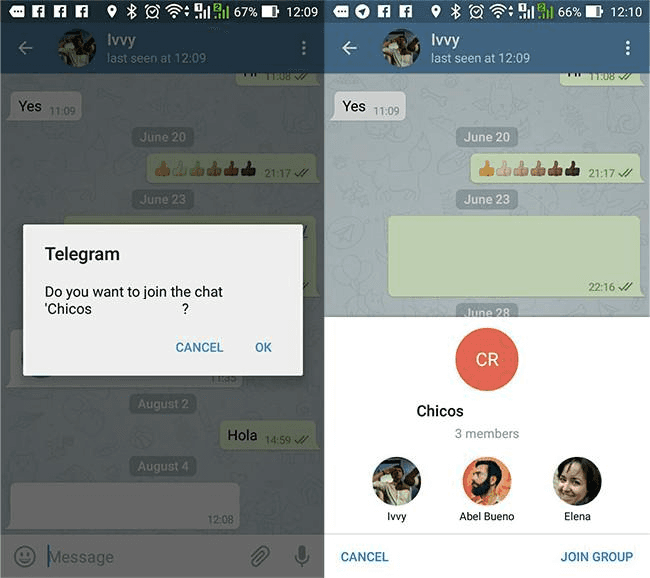
If the group is open and the invitation is still valid, you'll usually see:
the group name
the profile picture
the member count
a Join Group button
After joining, you'll immediately have access to the conversations, files, and other shared content (depending on the group's permissions).
Some invite links are permanent, while others are created to expire after a certain time or after a specific number of uses.
Where to Find Active Telegram Group Links
One of the biggest challenges is finding active Telegram groups.
Many websites publish invite links that no longer work or point to abandoned communities.
Some of the best places to discover Telegram groups include:
Telegram search
Search engines like Google
Social media communities
Reddit discussions
Friends or colleagues
Dedicated Telegram directories like TeleHub, where groups are organized by category and updated regularly
If you're searching for a specific topic—such as AI, investing, programming, gaming, or sports—a directory can often save time compared to scrolling through outdated lists.
The best communities usually have:
active daily discussions
engaged members
clear group rules
regular moderation
How to Join a Telegram Group Using a Link
Joining a Telegram group is simple.
Just follow these steps:
Click the Telegram invite link.
Open it in the Telegram app or browser.
Review the group's name and member count.
Tap Join Group.
That's it.
If the group is private, the invite link must still be active.
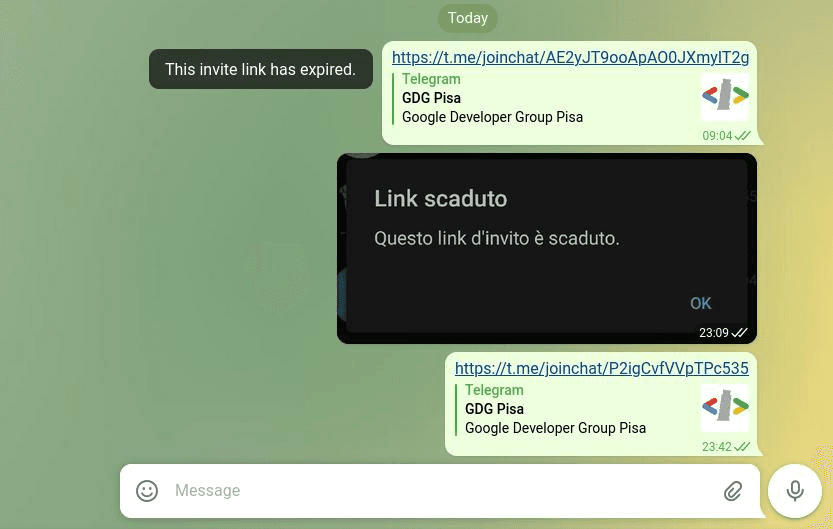
If it has expired, Telegram will usually display an error instead of letting you join.
How to Tell if a Telegram Group Link Is Safe
Most Telegram group links are perfectly safe, but it's still worth taking a few seconds to evaluate a community before joining.
Here are a few good signs:
✅ Active conversations
✅ Clear group description
✅ Legitimate topic or purpose
✅ Moderators enforcing rules
✅ No obvious spam immediately after joining
Be cautious if you notice:
promises of guaranteed profits
requests for passwords or recovery codes
constant unsolicited direct messages
suspicious download links
pressure to send cryptocurrency immediately
A legitimate community usually focuses on discussion first, not asking new members for money.
Why Some Telegram Group Links Stop Working
If you click a Telegram invite link and receive an error, there are several possible reasons.
The most common ones include:
Reason | Explanation |
|---|---|
Invite link expired | Administrator disabled it |
Group was deleted | Community no longer exists |
Invite revoked | A new invite replaced the old one |
Group became private | Old links stopped working |
Link copied incorrectly | URL is incomplete or broken |
Broken links are very common on older websites and blog posts.
If one doesn't work, it's often easier to find a newer invitation than trying to troubleshoot the old one.
Tips for Finding the Best Telegram Groups
Not every large Telegram group is worth joining.
A smaller, well-managed community is often much more valuable than a huge group filled with spam.
When searching for Telegram group links, look for communities that have:
active conversations throughout the week
moderators who remove spam
members asking and answering questions
a clear purpose or niche
recent activity
If you're exploring a new topic, don't feel like you need to join dozens of groups immediately.
Instead, try joining two or three high-quality communities first and spend a little time reading the conversations. You'll quickly get a feel for whether the group is genuinely helpful or simply filled with promotions.
Taking a few extra minutes to choose the right communities often leads to a much better Telegram experience than joining every invite link you come across.
FAQ
What are Telegram group links?
Telegram group links are invitation URLs that let people join Telegram groups without being manually added by an administrator.
Are Telegram group links free?
Yes. Joining Telegram groups is generally free unless the group itself has separate membership requirements.
Why doesn't my Telegram group link work?
The invite may have expired, been revoked, or the group may no longer exist.
Can anyone join a Telegram group using a link?
Public groups are open to anyone, while private groups require a valid invitation link.
Are Telegram group links safe?
Most are, but it's always a good idea to avoid groups that immediately ask for money, personal information, or sensitive account details.
Where can I find active Telegram group links?
You can find them through Telegram search, community forums, social media, and dedicated Telegram directories like TeleHub that organize groups by category.
Related Articles
Start with the main guide
This subpage belongs to a larger pillar article. Read the main guide for the full overview and related steps.

Telehub reminder