 Telehub
1. What Does “This Channel Can Not Be Displayed” Mean on Telegram?
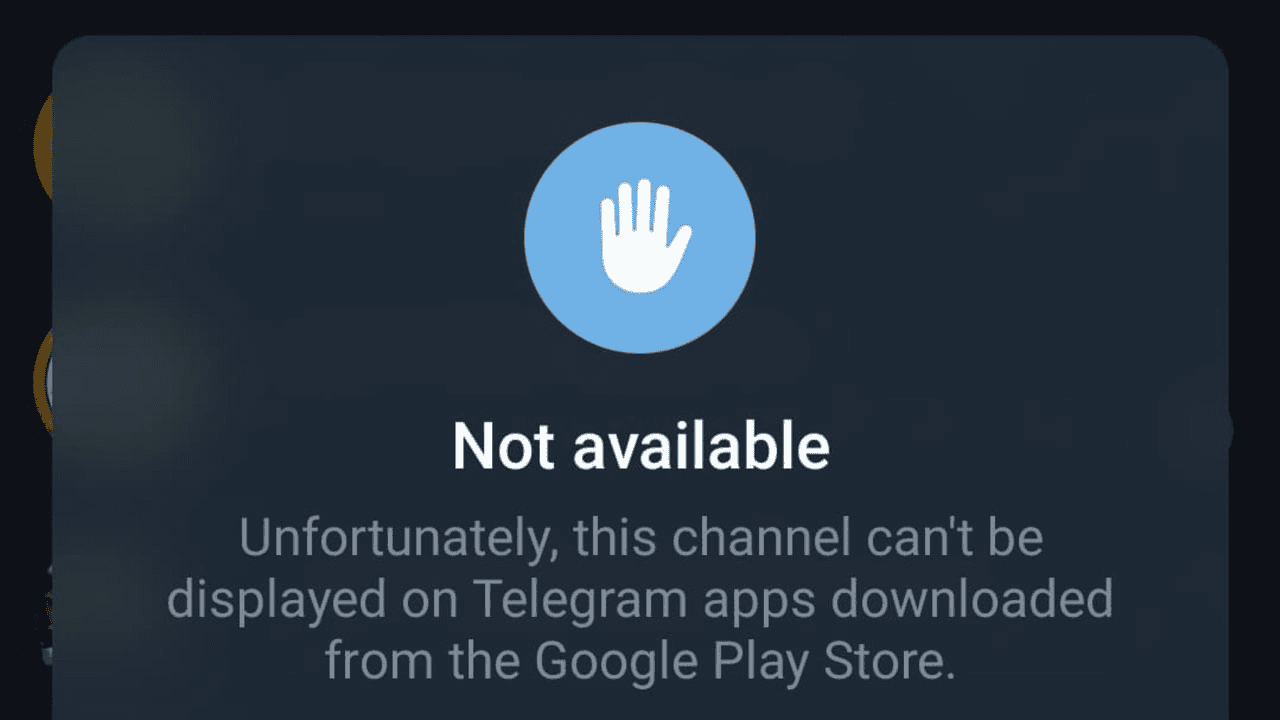
When Telegram displays a message saying that a channel cannot be displayed, it means your current Telegram client or account isn't able to show that channel.
There isn't one universal cause.
Depending on the situation, the channel may:
Contain sensitive or adult content.
Be restricted on your platform.
Have been removed by Telegram.
No longer exist.
Have become private.
Be unavailable in your region.
Have an invalid or expired invite link.
The wording shown by Telegram can sometimes provide another clue.
For example, Telegram may specifically mention that a channel was used to spread certain prohibited content. In other situations, you may simply find that the channel is unavailable.
Before changing anything, determine whether the problem affects one specific channel or many channels.
If every other channel works normally, the issue is probably related to that particular channel rather than your internet connection or Telegram installation.

2. Sensitive Content Can Cause Channels to Be Hidden
One common reason people encounter this problem is Telegram's sensitive-content filtering.
Some public communities contain material that Telegram or the platform distributing the Telegram app may restrict.
This can include certain:
Adult communities.
Graphic material.
Sensitive media.
Other restricted content.
Importantly, Telegram can behave differently depending on which version of the application you're using.
A channel being inaccessible through one Telegram client therefore doesn't always prove that the channel itself has disappeared.
Telegram's own FAQ explains that it processes legitimate requests involving illegal public content while also distinguishing between public content and private conversations.
If the message explicitly identifies the channel as restricted for a particular type of content, that is a much stronger clue than a generic loading error.
3. Why Some Telegram Channels Won't Display on iPhone
iPhone users can encounter additional restrictions because apps distributed through Apple's App Store must comply with Apple's platform policies.
That means Telegram on iOS may not always display exactly the same content as Telegram through another platform.
If a channel is unavailable on your iPhone, first determine whether the channel still exists rather than immediately assuming something is broken.
You can check its public t.me page in a browser or see whether the same community is accessible through another official Telegram client available to you.
If the channel itself has been removed, switching devices won't restore it.
If the restriction is specific to the client or platform, however, the results can differ.
You should also make sure you're running a current version of Telegram before troubleshooting further.
4. Check Telegram's Sensitive Content Settings
Depending on your Telegram client, account, platform, and region, Telegram may provide settings related to sensitive-content filtering.
If such an option is available to you, review your Telegram privacy or content settings to see whether filtering is enabled.
The exact options aren't identical across every Telegram app.
This is important because instructions found online sometimes tell users to look for a particular switch that simply isn't present on their device.
If you can't find the option, that doesn't necessarily mean you're doing something wrong.
Your platform may not expose it.
Also remember that changing a sensitive-content preference won't restore a channel that Telegram has actually deleted or blocked for legal reasons.
5. The Channel May Have Been Deleted, Banned, or Made Private
Not every “channel cannot be displayed” problem is caused by a content filter.
Sometimes the channel itself is no longer publicly accessible.
For example, its owner may have:
Deleted the channel.
Changed its public username.
Converted access to private.
Replaced an old invite link.
Removed access to certain users.
Telegram itself can also take action against public content in circumstances described by its policies.
If you found the channel through an old website, social post, search result, or directory listing, the link may simply be outdated.
Try finding the community's official website or social profiles and checking whether it has published a newer Telegram link.
Be careful with replacement channels claiming to be the "new official" version of a popular community. Scammers sometimes imitate channels that disappear.

6. Try Telegram Web or Another Official Telegram App
If you believe the channel still exists but your current Telegram application won't display it, comparing what happens through another official Telegram client can help diagnose the problem.
For example, you can compare the behavior with Telegram's web application:
If the channel works through one official Telegram client but not another, that strongly suggests the problem is related to the application or platform rather than the channel being completely gone.
You can also:
Update Telegram.
Restart the application.
Sign back in if appropriate.
Verify that you're opening the correct link.
Check whether other channels work.
Avoid downloading modified Telegram apps from random websites just to access a channel. Giving an unofficial application access to your Telegram account can create a much bigger problem than a blocked channel.
7. What if the Channel Is Restricted by Telegram?
Some restrictions aren't something you can fix locally.
If Telegram has removed a public channel for violating its rules or has restricted it because of legal requirements, changing an app setting may not restore access.
Similarly, you shouldn't attempt to bypass restrictions protecting against illegal material.
If you believe a legitimate channel was restricted incorrectly, the channel owner is generally in a better position to investigate the issue through Telegram.
For ordinary users, the useful distinction is:
Client-side filtering: The channel may still exist, but your current Telegram client isn't displaying it.
Channel-level restriction: Telegram itself has restricted or removed access to the community.
Private/deleted channel: The original public link may simply no longer lead to an accessible channel.
Identifying which situation you're dealing with prevents you from wasting time trying unrelated fixes.
Frequently Asked Questions
Why does Telegram say “This channel can not be displayed”?
Telegram may be unable to display a channel because of sensitive-content restrictions, platform policies, regional restrictions, an invalid link, or because the channel has been removed or made private.
Why can't I view some Telegram channels on iPhone?
The Telegram app distributed through Apple's ecosystem can be subject to platform content requirements. As a result, some content may behave differently depending on the Telegram client you're using.
Can sensitive content be hidden on Telegram?
Yes. Telegram has mechanisms for restricting or filtering certain sensitive public content, although available controls can vary by client, platform, account, and region.
Why can I see a Telegram channel on one device but not another?
Different Telegram clients and platforms can have different content restrictions. If the exact same account can access the channel through one official client but not another, the difference is likely client or platform related.
Does “This channel can not be displayed” mean I was banned?
Not necessarily. A restriction affecting the entire channel is different from an individual user being removed or banned from a community.
Can a deleted Telegram channel be recovered?
If you're simply a subscriber, you cannot restore somebody else's deleted channel. If the community moved somewhere else, look for a new link from a source you trust.
Is it safe to use unofficial Telegram apps to view blocked channels?
Using unknown third-party applications introduces account and privacy risks. Stick to official Telegram applications and websites rather than giving your account credentials to an untrusted client.
How do I know if the Telegram channel still exists?
Check the original t.me address, look for updated links from the channel's legitimate website or social accounts, or compare its availability using another official Telegram client.
Related Articles
Start with the main guide
This subpage belongs to a larger pillar article. Read the main guide for the full overview and related steps.

Telehub reminder