 Telehub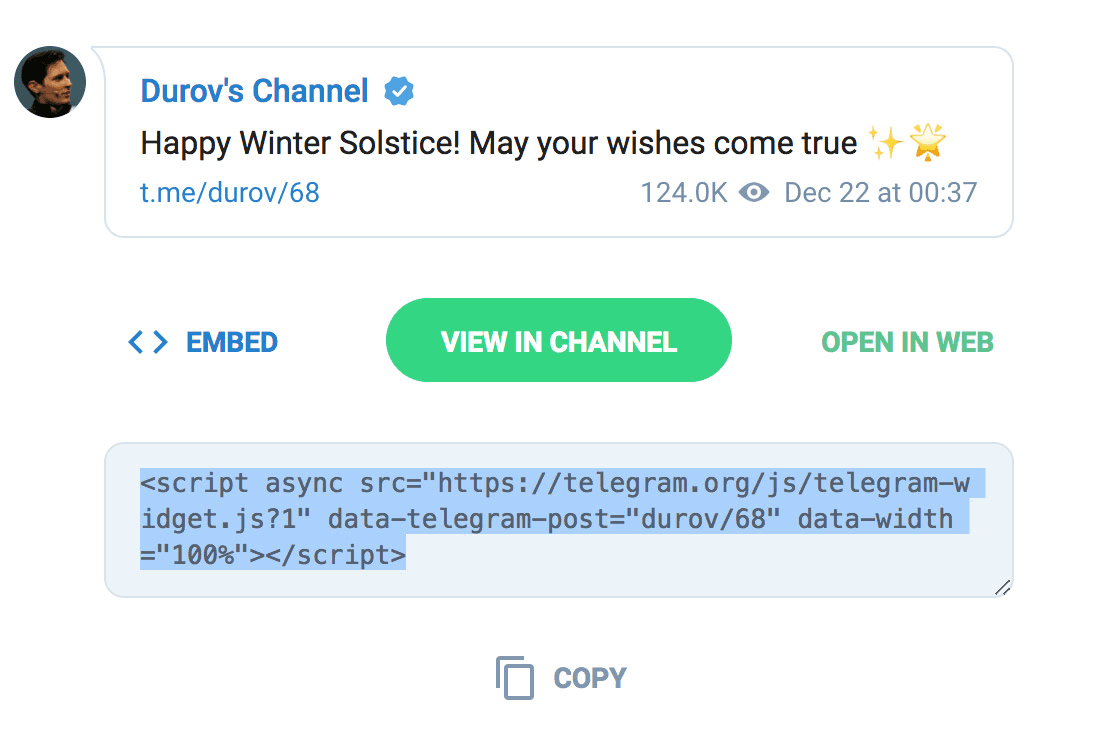
What Is a Telegram Widget?
A Telegram widget is an embeddable component that displays information about a Telegram group or channel directly on a website.
Instead of showing only a text link, widgets can display:
Telegram profile image
Channel or group title
Username
Description
Member count
Join button
Custom styling or themes
This makes Telegram communities feel more integrated into a website rather than existing as a separate platform.
For example, a creator could place a Telegram widget underneath blog posts, while a crypto project could add one directly to their homepage.
Why Telegram Widgets Are Useful
Most Telegram communities grow through direct links shared across social media. The problem is that regular links often blend into the page and fail to stand out.
Widgets improve visibility because visitors can immediately see:
what the community looks like
who it belongs to
what type of content it shares
how to join
This creates a much stronger call to action.
Telegram widgets are especially useful for:
Use Case | Why It Helps |
|---|---|
Crypto communities | Makes Telegram groups easier to discover |
SaaS startups | Builds community around products |
Content creators | Converts readers into followers |
Education groups | Helps students join quickly |
Gaming communities | Displays active community branding |
Businesses | Promotes support or announcement channels |
How the Telehub Telegram Widget Generator Works
The Telehub Widget Generator makes the process simple.
Users only need to:
Paste a Telegram invite link
Generate the widget
Choose a theme
Copy the embed code
Paste it into their website
The tool automatically creates a styled Telegram card using publicly available channel information.
Unlike basic embeds, the Telehub widget system includes multiple visual themes and a live preview system so users can customize how the widget appears before embedding it.
Telegram Widget Themes
One of the best features of the Telehub widget system is the ability to switch between different visual styles.
Light Theme
The light theme uses a clean, modern design that works well on most websites.
It is especially useful for:
business websites
blogs
documentation pages
educational sites
Dark Theme
The dark theme works well for:
gaming websites
crypto communities
developer tools
technology brands
Dark mode widgets often blend better into modern landing pages.
Glass Theme
The glass theme uses a more modern translucent look inspired by glassmorphism design trends.
This style includes:
blurred backgrounds
transparency effects
soft gradients
modern shadows
Glass widgets tend to work especially well on creative or premium-looking websites.
How to Embed a Telegram Widget
After generating the widget, Telehub provides an iframe embed code.
Example:
Users can paste this code into:
Framer
Webflow
WordPress
HTML websites
landing pages
blog posts
The widget then loads automatically on the page.
Best Places to Use Telegram Widgets
Where you place your widget matters.
Homepage
Embedding a Telegram widget on the homepage gives visitors immediate access to your community.
This works especially well for startups and creator brands.
Blog Articles
Widgets underneath blog posts can convert readers into long-term followers.
For example:
Want more updates? Join our Telegram community below.
This creates a natural conversion point.
Product Pages
Many brands use Telegram for:
announcements
support
launch updates
exclusive deals
Adding widgets to product pages helps users stay connected after purchasing.
Community Pages
Some websites create dedicated pages listing:
Discord servers
Telegram channels
social communities
Telegram widgets make these pages feel much more interactive.
Telegram Widgets vs Normal Telegram Links
Feature | Telegram Widget | Plain Link |
|---|---|---|
Visual design | Yes | No |
Community preview | Yes | No |
Branding | Strong | Weak |
Better engagement | Usually | Limited |
Theme customization | Yes | No |
Looks professional | Yes | No |
Widgets generally perform better because they give visitors context before clicking.
Why Telegram Widgets Help Community Growth
Telegram growth is heavily influenced by visibility and convenience.
The easier it is for visitors to:
recognize your community
trust it
understand it
join it
…the faster communities tend to grow.
Widgets reduce friction because users do not need to:
search manually
copy invite links
guess what the community is about
Everything is displayed immediately.
This is one reason more websites are beginning to integrate Telegram directly into their site layouts instead of treating it like a hidden social link.
Keep reading
Related articles
More TeleHub guides connected to this topic, updated automatically as new posts are published.

Info
This Channel Can Not Be Displayed Telegram
Seeing “This channel can not be displayed” on Telegram? Learn why channels get hidden or restricted and what you can do to troubleshoot the error.

Info
Best Telegram Channels
Discover some of the best Telegram channels to follow and learn how to find top channels for news, technology, gaming, crypto, education, entertainment, and more.
Info
Telegram Group Promotion
Learn the best Telegram group promotion strategies, including partnerships, directories, content marketing, community building, analytics, and long-term growth techniques.

Info
Telegram Channel Promotion
Learn the most effective Telegram channel promotion strategies, including directory listings, partnerships, content marketing, search optimization, and subscriber retention techniques.
Telehub reminder